
OnlyFans Release Form (2026): Requirements & Step-by-Step Guide
Learn what an OnlyFans release form is, when creators must use it, and how to complete consent and verification correctly. This guide explains release form PDFs, identity checks, and how adult creators protect their content and income, with insights on building your own creator website using Scrile Connect.

onlyfans release form
Learn how OnlyFans release forms work in 2026, when collaborators need verification, where to find the official release form tools, and how to avoid common consent and ID mistakes. Includes a step-by-step guide, practical checklist, and answers about PDF forms and verified creator tagging.
What is an OnlyFans release form, and when do you need one? An OnlyFans release form helps document the age, identity, and consent of another person appearing in your content. If you publish material featuring someone else, you must follow OnlyFans’ co-authored content requirements before uploading it.
In practice, there are two common situations:
- Your collaborator is a verified OnlyFans creator: You can generally tag their verified account using the platform’s tagging feature.
- Your collaborator is not a verified creator: They need to complete the applicable identity and consent verification process, which may involve an invitation or release form through OnlyFans.
You can access the official OnlyFans Release Forms section after signing in.
This guide explains how to find the form, what information may be required, whether a PDF is necessary, and how to check that your collaborator’s documentation is in order before publishing. It also covers common mistakes, consent withdrawal, and practical recordkeeping.
Why Does OnlyFans Require Release Forms?
OnlyFans needs to establish that people appearing in co-authored content are adults and that the content is being shared with the necessary permission.
Release forms and creator verification help address three separate issues:
- Age and identity: Confirming that the person appearing in the content is an adult.
- Informed consent: Establishing permission to record and share the content.
- Publication authorization: Documenting which material may be published and under what conditions.
These requirements protect participants and help the platform investigate complaints about unauthorized content.
They should not be confused with every legal obligation that may apply to producing adult content. For example, some US producers may have additional age-verification and recordkeeping duties under 18 U.S.C. §2257.
A platform release form does not automatically replace independent legal records, nor does age verification alone establish consent to every possible use of someone’s image or video.
In many ways, adult platforms follow the same documentation standards used in professional photography and film production. Any recognizable person appearing in commercial media normally signs a model release before the material is published.
“A model release is a legal document that grants permission to publish photographs or videos in which a person is recognizable.”
Chad Mann, civil-litigation attorney practicing in Southwest Missouri.
Adult content platforms apply this rule even more strictly. The material is explicit and often sold through subscriptions or pay-per-view access. Without written consent, a creator could face complaints, payment disputes, or even legal claims from collaborators.
When You Actually Need a Release Form

The key question is not whether your content is paid, public, or explicit. It is whether another person appears in the content and whether their identity and consent have been properly documented.
| Situation | What to do |
|---|---|
| Solo content featuring only the verified account owner | No separate co-performer release form is generally needed |
| Collaboration with another verified OnlyFans creator | Use the platform’s creator tagging feature and follow its consent requirements |
| Content featuring someone without verified creator status | Complete the applicable release form or verification process before publishing |
| Group content with multiple participants | Check every participant individually; verified creator tags and other required records may differ |
| Paid content featuring only yourself | A second person’s release form is not required solely because the content is sold |
| Content featuring a partner who does not want a creator account | Check the available invitation-based identity and consent process in your OnlyFans account |
Is Tagging a Verified Creator Enough?
OnlyFans’ co-authored content terms recognize tagging an eligible verified creator as one way to identify a participant.
However, tagging is not the same as a private collaboration agreement. If you produce content together, it is sensible to agree separately on who may publish it, where it may be distributed, whether it may be sold, and what happens if someone later requests removal.
What If a Person’s Face Is Not Visible?
Do not assume that blurring a face or filming someone from behind removes the need to address participant verification and consent.
If another person appears in your content, check the platform’s requirements before uploading. The safest approach is to resolve uncertainty through OnlyFans support rather than assume that an unidentifiable participant is exempt.
Where to Find the OnlyFans Release Form
OnlyFans provides release form and participant-verification tools inside creator accounts.
You can start from the official page: Open OnlyFans Release Forms
You must be signed in to access this section.
How to Get and Submit an OnlyFans Release Form
- Sign in to your verified creator account. Open the Release Forms section, which may be accessible through the More menu.
- Choose the appropriate verification option. Depending on the collaborator’s status and available account features, this may involve tagging a verified creator or creating a release form invitation.
- Generate the invitation or release form link. Follow the instructions displayed in your account.
- Send the link securely to your collaborator. They should complete the required identity, age, and consent steps themselves.
- Check the submission status. Do not assume that sending the link means the process has been approved.
- Associate the approved participant with the relevant content. Follow the platform’s tagging or release form selection requirements when uploading.
- Keep appropriate records. Maintain any additional agreements and legally required documentation securely.
The exact buttons, requested documents, and approval workflow can change. If you cannot access the feature or a submission remains pending, consult OnlyFans support before publishing the content.the OnlyFans release form PDF attached to the creator’s account.
OnlyFans Release Form PDF vs. Digital Verification
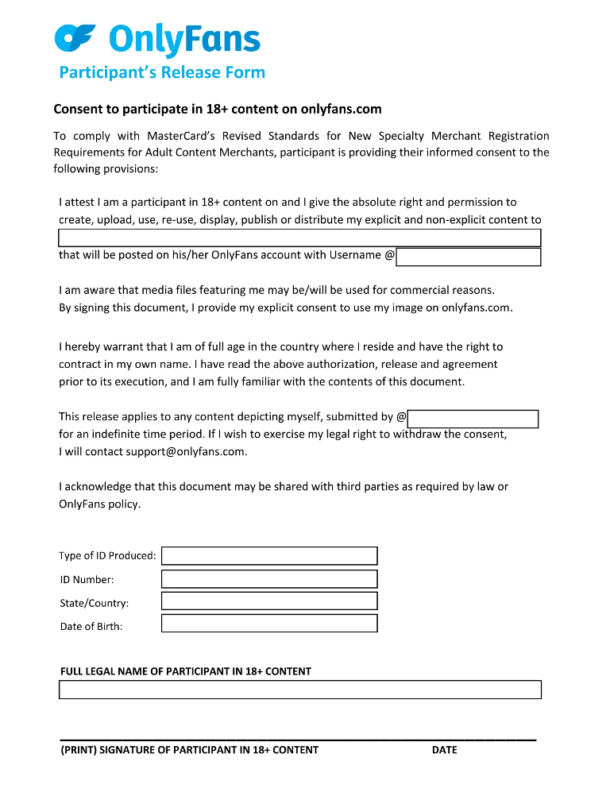
If you’re searching for an “OnlyFans release form PDF,” it’s important to distinguish between the platform’s own verification process and a general-purpose model release agreement.
| Document or method | Main purpose |
|---|---|
| OnlyFans digital release or verification process | Records the participant’s identity and consent through the platform’s supported workflow |
| Verified creator tagging | Identifies an eligible verified creator appearing in content |
| Independent model release agreement | Documents additional permission, licensing, distribution rights, or other arrangements between participants |
| Collaboration agreement | Defines business matters such as revenue sharing, content ownership, publishing permissions, and disputes |
Can You Download an OnlyFans Release Form PDF?
Some guides refer to downloadable or printable OnlyFans release forms. However, a PDF obtained from a third-party website should not be assumed to satisfy OnlyFans’ current verification requirements.
Use the release form tools available inside your account and confirm the accepted submission method with OnlyFans.
You can keep a separate signed model release for your own records where appropriate, but it does not automatically replace the platform’s identity and consent checks.
What Should a Separate Model Release Cover?
A professionally prepared agreement may include:
- Legal identity of the participants
- Date and description of the production
- Confirmation that the participant is an adult
- Clear consent to recording and specified publication
- Platforms and distribution channels covered
- Agreed commercial usage rights
- Compensation or revenue-sharing arrangements, if applicable
- Duration, removal requests, and dispute procedures
- Dated signatures
The exact legal language depends on jurisdiction and intended use. Have a qualified professional review any agreement you intend to rely on.reator if disputes appear later.
How Identity Verification and KYC Work

Adult platforms use identity verification systems to confirm that every performer is legally allowed to appear in explicit content. The process is similar to financial KYC checks used by payment providers.
Typical verification steps include:
- uploading a government ID document
- facial recognition using a selfie photo
- automated age verification checks
- compliance checks against identity databases
Some services use external verification tools such as Ondato verification for OnlyFans, which helps confirm identity documents and detect fraud.
These checks are required because adult platforms must maintain proof that all performers are adults. Regulations across the adult industry demand documented age verification and consent records for anyone appearing in explicit content.
Income Example: Why Documentation Protects Your Revenue
Many creators underestimate how closely compliance and income are connected. Imagine a typical adult creator account with around 10,000 followers. Conversion rates on subscription platforms often sit near one percent. That means roughly 100 people subscribe. With a $10 monthly subscription, the creator earns about $1,000 every month before platform fees.
Now imagine the platform flags content because a collaborator never submitted proper documentation. The post may be removed, payouts can be delayed, and in serious cases the account may be restricted during review. For creators relying on subscription income, even a temporary interruption can affect earnings.
Proper records such as the OnlyFans release form protect that revenue. Signed consent documents prove that every performer agreed to participate, allowing creators to keep publishing and monetizing their content without legal or compliance disputes.
Running a Creator Website With Scrile Connect
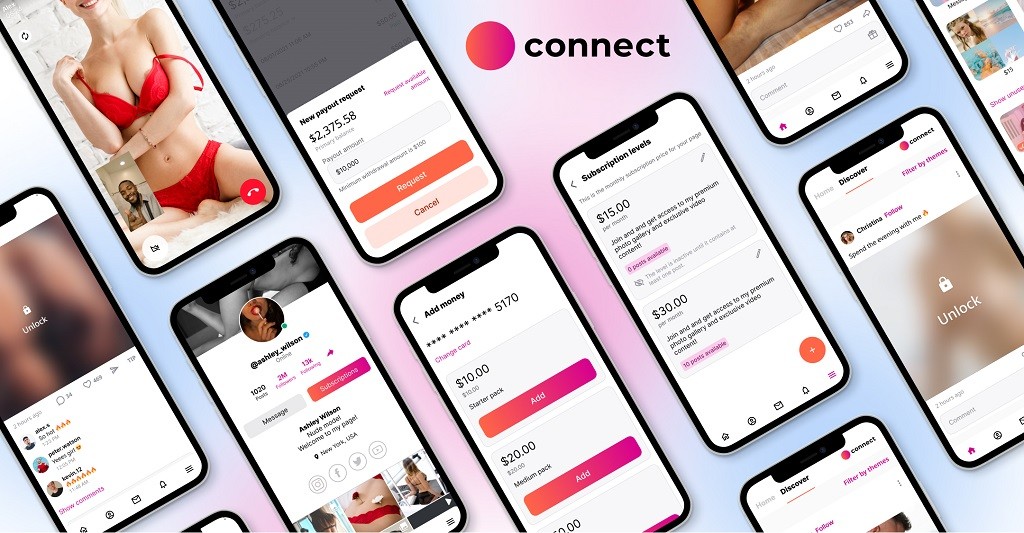
Many adult creators begin their careers on subscription platforms. Over time, some decide to move beyond a single account and build their own websites. The motivation is simple. Running an independent site allows creators to control branding, payments, and compliance without relying entirely on platform policies.
This is where Scrile Connect enters the picture. Scrile Connect is not a platform where creators register accounts. It is a custom development service that builds fully tailored creator websites. The idea is to give adult creators the same tools used by established online businesses.
On a dedicated site built with Scrile Connect, creators can embed consent forms, performer agreements, and identity verification directly into the workflow. Documentation stays organized in one place, instead of being scattered across messages or third-party tools. It also becomes easier to integrate KYC providers, manage age verification, and define clear compliance rules for collaborators.
Key capabilities of Scrile Connect usually include:
- custom creator website built around the creator’s brand
- subscription and pay-per-view monetization systems
- integrated verification tools for performers
- document storage for release forms and compliance records
For many adult creators, having their own site shifts the perspective entirely. The project stops feeling like just another platform account and starts looking like a real business operation.
For teams handling consent documentation across multiple creators, creator agency platform software offers an owned environment for managing creator profiles, paid content, and payouts alongside the agency’s compliance processes.
Quick Guide: When You Need a Release Form
| Situation | Release Form Required | Reason |
| Solo content | No | Only the creator appears |
| Content with verified creator | Usually no | Both identities verified |
| Collaborating with non-creator | Yes | Consent must be documented |
| Group scenes | Yes | Every performer must verify |
| Paid adult content | Yes | Protects against disputes |
Conclusion
The OnlyFans release form plays a critical role in protecting everyone involved in adult content creation. It confirms consent, verifies that performers are adults, and documents the agreement to publish and sell the content online. These records help prevent disputes and give creators proof that collaborators approved the material. In many ways, the process mirrors the legal paperwork used in professional film and media production.
For creators who treat their work as a serious business, clear documentation and verification are essential. Some eventually move beyond a single platform and build their own websites with integrated compliance tools. If you want more control over content, verification, and monetization, contact the Scrile Connect team to explore building your own creator platform.
FAQ
How to get a release form for OnlyFans
Creators can generate the OnlyFans release form directly inside their account dashboard. Log into OnlyFans, open the More menu, and select Release Forms. Choose Create release form by link, enter the number of performers and their names, then send the generated link to collaborators. Each performer verifies themselves by uploading an ID selfie, which confirms their identity and age before the form is recorded.
How do I create a release form
A release form must clearly identify everyone involved and confirm consent to publish the content. Typical elements include the names of the parties, a description of the project, and the permissions granted to use the performer’s image. The document should also include signatures from all participants. On OnlyFans this process is automated through the built-in release form system, which collects ID verification and digital consent.
How many OnlyFans subscribers do you need to make $1000
Income depends on conversion rates and subscription price. For example, a creator with around 10,000 followers may convert roughly 1% into subscribers, which equals about 100 paying fans. With a $10 monthly subscription, that results in about $1,000 per month before the platform takes its percentage.
Do collaborators need ID verification on OnlyFans
Yes. Anyone appearing in adult content must confirm their identity and age. Collaborators either tag their own verified OnlyFans account or complete the release form verification process. This includes uploading a government ID and selfie so the platform can confirm the performer is legally an adult.
What happens if you upload content without a release form
OnlyFans can remove the content if a collaborator appears without proper verification. In some cases the platform may temporarily restrict the account or delay payouts while the situation is reviewed. Missing documentation can also create disputes if a collaborator later claims they never agreed to the publication.
