
Virtual Classroom Software for Business in 2026: Build or Buy?
This guide compares prebuilt virtual classroom software solutions and custom-built solutions, providing you insight on when to buy, when to build, and how to select the right online live classroom software solution to fit your needs. You’ll find key features of the software, ROI examples, and expert advice on creating a professional, engaging, and fully branded virtual classroom.


virtual classroom software
Introduction
If you are trying to decide if you should build or purchase a virtual classroom, the short answer is that most content creators and small teams will get started by using off-the-shelf virtual classroom software or an online live class platform. It’s affordable, easy to set up, and allows you to spend your time creating content instead of managing technology.
A custom-built online classroom platform or white-label solution can give you complete control over your brand, advanced features, and the ability to integrate with your systems. This can be especially valuable for growing companies, corporate training programs, and creators who want to provide a polished, proprietary experience to their audiences.
In short: Buy it if you want something quick and easy to use. Build if you want to customize, brand, and scale long-term.
Build vs. Buy: Which Virtual Classroom Approach Fits Your Needs?

Choosing to build or buy a live teaching platform can be a challenging decision for all creators and entrepreneurs. The advantages and disadvantages are inherent in each choice. The proper decision will depend upon your goals, budget, and time frame. Let’s look closely at each option.
Buying Ready-Made Software
If you’re only looking for a really quick way to get started, ready-to-use solutions may be good. Most come with easy-to-use dashboards, integrated features, and ongoing updates, and you can normally expect to budget $100-$500 per month to subscribe (for a small team).
Pros:
- Fast deployment (up and running in days).
- Low initial cost vs. building yourself.
- Regularly provided technical support and updates.
Cons:
- Limited branding. Your class could look like hundreds of others.
- Limited Features. You may need something customized later.
- Third parties are responsible for uptime and security.
Best suited for small teams, short-term classes, or testing audience interest.
Building Your Own (White-Label / Custom)

Brand control, custom features, and systems integration (if important) will assist your decision to create online classroom platform. You can either design it from scratch or use a white-label service, which allows for complete branding.
Benefits:
- Full brand control.
- Custom functionality.
- Seamless integration into your current tools or workflows.
- Ability to scale easily for your corporation’s or currently running client’s training needs or certifications.
Challenges:
- High upfront costs ($50,000 to $200,000 depending on features).
- Long development or setup time, usually months before you can get it running.
- Continued requirement of IT support and maintenance. Expertise.
Quick Comparison Table: Build vs. Buy

| Option | Cost | Deployment time | Brand control | Integration | Best for |
| Buy (SaaS) | $100–$500 per month | Days | Low | Moderate | Small teams, quick launch |
| Build (White-Label) | $50k–$200k | Months | High | Full | Enterprise, branded programs |
Ultimately, you’ll want to consider your scale and strategy. If you want a distinct and professional experience where you have complete control, then building is your best option. However, if you want a simple and quick solution that carries fewer risks, it’s perfectly acceptable to purchase a prebuilt option.
Hidden Trade-Offs: Build vs. Buy

| Factor | SaaS (Buy) | Custom build / White-label |
| Vendor lock-in | Switching platforms is a high risk due to lack of data export options and how ecosystems are dependent on one another. | No lock-in means that you have full control of your platform and can migrate with ease. |
| Maintenance & updates | All managed by your service provider, you will have minimal input from a tech standpoint. | You have full responsibility and are therefore responsible for continuing development, fixing bugs, and keeping your platform updated. |
| Data ownership | Data is hosted via a third party. Limited amount of control over where and how data is stored and what the rules/policies are in place regarding the storage of that data. | End-users own and control all data, how it’s stored, and any related analytics. |
| Scalability | It can be easily scaled within the limits of the platform but may limit custom workflows and features. | Can be very flexible in terms of how you design your architecture/resources so that they can be efficiently scaled. |
| Security & compliance | Designed by the provider, but based on their SLAs and uptime. | Customized totally, but the customer is responsible for internal security, backups, and compliance. |
| Customization | Will not exceed the features of the platform. | The customer has unlimited flexibility to customize. |
| Long-term cost (TCO) | The cost to the customer is less upfront but may become costly in the future as recurring monthly subscriptions can accumulate. | The cost to the business is high upfront, but once developed, it may be lower for high volume. |
Key takeaway:
SaaS solutions reduce operational complexity while providing limited control over the solution itself. Customized solutions increase your level of flexibility but will require a considerable investment in terms of time and effort to maintain the solution over the long term.
Quick Decision Framework

Use the following simple logic when figuring out which approach to take.
Buy SaaS if you:
- Need to launch quickly (days instead of months).
- Have a budget within limits or are testing an idea.
- Do not have an in-house tech team.
- Can live with standard features and limited customization.
Custom build or white-label, if you:
- Require complete control of branding/user experience.
- Plan to scale (corporate training, large audiences, certification programs).
- Require deep integrations (CRM, LMS, or internal systems).
- Want to own your data and avoid vendor lock-in.
Do not consider building (even if it’s tempting) unless:
- Your budget is $20-30K or greater.
- You need results in less than 1-2 months.
- You do not have access to reliable developers and/or to a product team.
- You are not currently validating your business model.
In short:
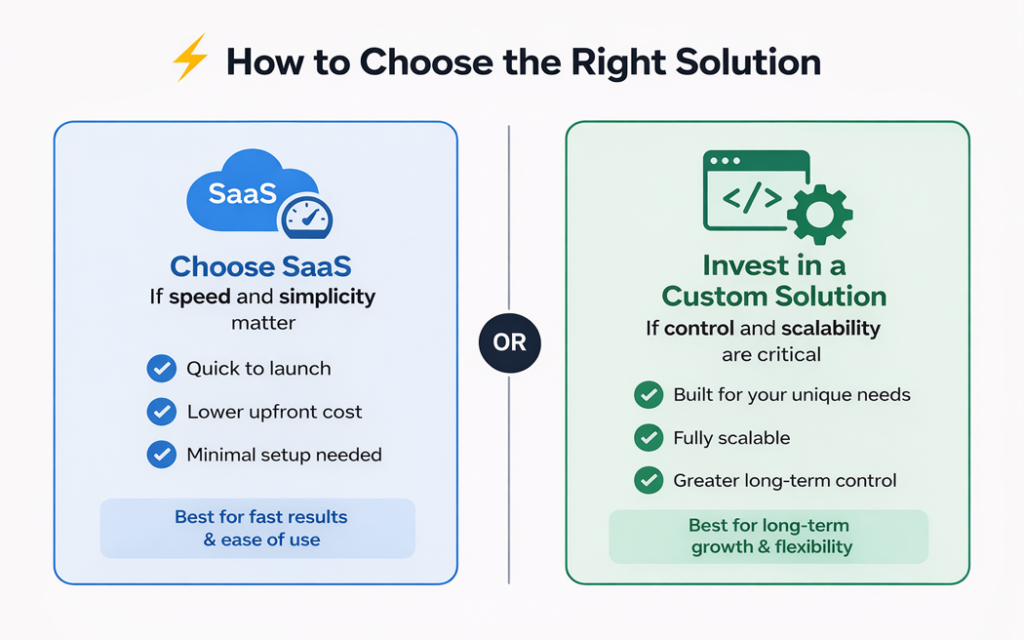
If speed and simplicity matter → go with SaaS.
And if control and scalability are critical → invest in a custom solution.
7 Common Mistakes When Choosing Virtual Classroom Software

Experienced teams can make some expensive mistakes when selecting an online classroom platform. Below are mistakes to avoid that will save your team time, money, and frustration:
1. Choosing SaaS for Long-Term Enterprise Scaling
Many companies start out using an inexpensive or popular SaaS tool, not thinking about future growth. While this may work fine for small teams, the brand limitations, integration limitations, and workflow limitations will severely limit your ability to scale.
2. Building Before Validation
Some creators or startups spend a lot of money building their own custom solution before validating their target audience or validating their business model. If the custom-built program does not succeed in the marketplace, you could be out of resources, because high upfront costs and a long development cycle could be wasted.
3. Ignoring Integrations
If a platform does not integrate with a student’s LMS, your organization’s CRM, your organization’s HR tools, or your organization’s analytics tools, you will be creating additional work for yourself, and your data will be fragmented. Making sure to include integrations as part of your criteria from the beginning should be a top priority.
4. Underestimating Maintenance and Technical Needs
Again, if you have a custom solution or a white label solution, you will need to continually provide ongoing upgrades and error corrections and provide security management for your program. Many teams think they’re underestimating their maintenance and technical needs and then end up overburdened or forced to hire other partners for help.
5. Overlooking User Experience
If the platform is set up in a very complicated manner, students and instructors are likely to become frustrated. If the platform is not intuitive, students will lose interest and may drop out of a course. You should always test out demos or trials of the platform before making a commitment to that platform.
6. Focusing Only on Cost
The cheapest solution may save you money initially but could cost you more than if you had selected a more expensive solution because of limitations on the future scale of your program, limitations on features, and limitations on branding. Always consider TCO (Total Cost of Ownership) and ROI (return on investment).
7. Not Considering Compliance and Security
If you do not plan to comply with GDPR, HIPAA, or your organization’s corporate security standards, you could end up with a legal risk and operational risk. Make sure your solution provider supports the compliance requirements your company will have from day one, not today.
Key takeaway:
These mistakes can ensure that your implementation will be much smoother, more engaging, and provide a better return on investment, regardless of whether you select a SaaS solution or build your own custom solution.
Corporate Training Scenarios

Teams in corporate organizations require different types of training than traditional classroom environments. Solutions for training teams include new employee onboarding, client training, or organization certification. Virtual classroom learning provides a structured training solution that minimizes costs and maximizes learning opportunities.
Employee Onboarding
Imagine a company onboarding 50 new employees per quarter. Each employee attends a 2-hour live session weekly for four weeks. Using a standard online classroom platform, a SaaS solution might cost $500 per month. Over a year, that’s $6,000.
Next comes the custom-built white-label platform, with a one-time investment of $75,000 ($15,000 per year amortized over five years). This means that although your initial cost is higher, your savings are multiplied as your team grows. You will also have complete brand control, reporting dashboards, and integration into your HR tools, which are all features that you cannot do with a subscription-based platform.
Client Training
Many companies provide product or service training for clients. A live teaching platform can host interactive sessions, distribute materials securely, and track attendance and completion rates. The platform pays for itself when you train 200 people a year at $150 a course while enhancing your client’s satisfaction.
Certification Programs
These programs are based on rigorous criteria for content, testing, and access. The white-labeled online classroom platform will handle all certificates and branding, automate verification of certificates, and allow organizations to have multiple concurrent cohorts using one system, benefiting any organization with continuing education.
Mini-Calculation Example:
- 200 clients × $150/course = $30,000 revenue
- SaaS cost = $6,000/year → ROI = 5× initial spend
- White-label build = $75,000 amortized over 5 years → annual cost = $15,000 → ROI = 2× initial spend, with full control
In short, whether for employees or clients, virtual classroom training platforms not only simplify delivery but also provide measurable business value.
“Students of all levels, including those in corporate training, now rely on the internet to deliver educational materials.” Forbes
How to Choose the Right Virtual Classroom Software?

Choosing the right online live class platform can feel overwhelming. There are hundreds of choices claiming to be the best. Your best bet is to keep in mind your goals, audience, and size. Selecting carefully can save money, enhance engagement, and be less frustrating for the instructor and student alike.
Criteria For Making Your Selection
Consider these major points in selecting:
- What features are provided? Live video, breakout rooms, polls, quizzes, and a content library.
- Do you prefer a subscription model or a one-time build?
- Will it integrate with your LMS, CRM, or other business systems?
- Does the user experience seem easy for teachers and learners to navigate through? If the interface is confusing or difficult, students and instructors will experience frustration and discontinue use.
- Does it have room to grow as your number of courses, students, or concurrent sessions grow?
Popular Options
| Software | Type | Price | Key features | Ideal for |
| Livestorm | SaaS | $89–$299 per month | Video, polls, analytics | Small to medium teams |
| Merithub | SaaS | Custom | Course creation, reporting | Corporate learning |
| Arlo | SaaS | Custom | Scheduling, webinars | Training providers |
| Custom build | White-label | $50k+ | Full branding & integration | Enterprise/corporate |
Trade-offs are emphasized in the table. SaaS solutions are generally quicker and cheaper, while white-label builds allow for more control/brand leverage. Both can be viable options depending on your business goals. It is important to know your own priorities clearly.
Best Virtual Classroom Tools by Use Case
After weighing the pros and cons associated with building vs. purchasing (and understanding how they differ), you’re ready to get practical suggestions from actual businesses. Here are a few examples of companies that have followed the “best for small teams with a fast launch (SaaS)” approach.
Which Platform Fits Your User Type?
| User type | Goal | Recommended approach | Examples / Platforms |
| Small content creators / startups | Launch quickly, minimal cost. | SaaS | Zoom + Thinkific, Livestorm |
| Coaches / personal brand builders | Monetize courses, create a branded experience. | Creator platforms | LearnWorlds, Thinkific, Kajabi |
| Corporate training / HR teams | Onboard employees, structured programs, compliance | LMS SaaS or White-label | Moodle (customized), Arlo, Docebo |
| Large enterprises / high-scale programs | Full brand control, integration, analytics | White-label / Custom build | Fully custom-built platforms |
“Investing in a virtual classroom platform is not just about technology. It’s a strategic choice that affects engagement, branding, and long-term success.” Livestorm Blog
Launch a Branded Virtual Classroom Platform with Scrile Meet
Choosing virtual classroom software is not only about video calls. At some point, the real question becomes bigger: can your platform support your brand, your workflows, your instructors, your students, and your long-term business model?
Generic SaaS tools are useful when you need a fast start. But as your training business grows, disconnected tools can create problems. One system handles scheduling. Another one hosts video sessions. Payments happen elsewhere. Student communication moves to email or messengers. Reporting becomes fragmented. And the whole learning experience starts to feel less professional than the service you are trying to sell.
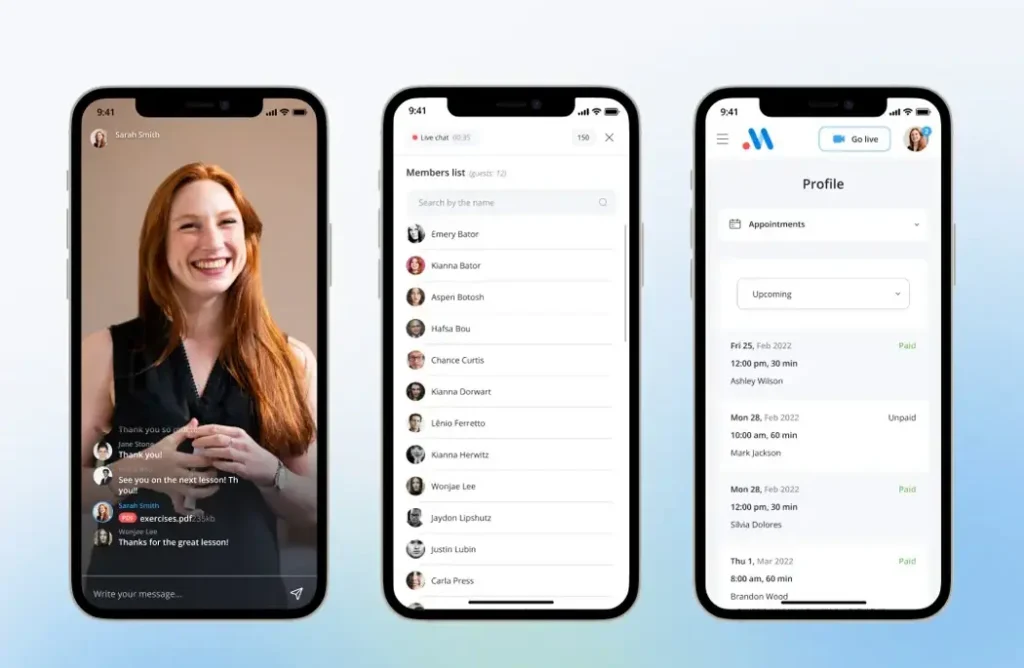
Scrile Meet helps businesses build a branded platform for online education, training, coaching, and consultation-based learning. Instead of adapting your program to someone else’s template, you can launch a platform built around your own service flow.
With Scrile Meet, you can create a virtual classroom platform with:
- your own brand, domain, interface, and user experience
- appointment scheduling and availability management
- private one-to-one video sessions
- group sessions for classes, workshops, webinars, and team training
- secure messaging for communication before and after sessions
- provider, instructor, or expert directories
- paid sessions, packages, and other monetization models
- admin tools for managing users, sessions, payments, and activity
- analytics and reporting for better operational visibility
- flexible customization for your business model, geography, and workflows
This approach works especially well for companies that want more than a basic video meeting tool. Corporate training providers, coaching businesses, education startups, HR teams, certification programs, and expert-based platforms can use Scrile Meet as a more structured foundation for online learning.
You do not have to build everything from zero. And you do not have to stay limited by a generic SaaS platform forever. Scrile Meet gives you a practical middle ground: a branded, customizable platform that can grow with your business.
Use standard virtual classroom tools to test the idea. Use Scrile Meet when you are ready to turn online learning into a controlled, professional, scalable platform.

Summing Up
Let’s recap. When deciding whether to develop or purchase your virtual classroom software, the primary considerations are cost, control, and size. If you are a small business, or testing content, or have no time or money, then the easiest thing to do would be to purchase a complete online live class delivery system. This allows you to concentrate on teaching and eliminates any worries about having the equipment to deliver classes in a live setting.
Key Points
- Speed is important but so is customization. You will require speed. However, if you wish to customize, then you must build your own solution.
- Branding will be an important part of developing your professional identity. Therefore, using white-label virtual classroom software creates a much better image than simply purchasing standard, off-the-shelf virtual classroom software.
- Companies will receive the greatest benefit from selecting a customized platform (for example, delivering employees’ training, offering training services to clients, or distributing certificates).
- You should not only look at the costs or benefits but also the long-lasting value or potential for growth.
The right virtual classroom software or online classroom delivery system converts disjointed learning tools into an organized learning experience. To an entrepreneur with limited resources, the difference between a messy technology solution and a professional branded educational product can be the difference in success.
