
Test Automation Solutions: How to Choose the Right Stack in 2026
Learn how modern teams build test automation solutions in 2026. Compare automation stacks, frameworks, and tools, and see how custom AI assistants built with Scrile AI can enhance QA workflows.

test automation solutions
The right automation stack depends on your product, release speed, and engineering workflow. Most teams choose between integrated testing platforms, modular stacks built from separate tools, or custom systems enhanced with AI. Start with frameworks that match your tech stack and connect them to CI pipelines with clear reporting. Mature teams often extend their test automation solutions with AI assistants that analyze failures and generate new tests.
Software teams release updates far more often than they did a few years ago. Many products now ship changes every week, sometimes every day. Under that pace, manual regression testing quickly becomes a bottleneck. Testers repeat the same checks while developers keep pushing new commits.
That shift changed how teams approach automation. Instead of relying on a single framework, they build test automation solutions that combine several components: a test runner, CI pipelines that trigger tests after each commit, reporting dashboards, and the environments where tests execute.
A typical SaaS team might run browser tests with Playwright, trigger them through GitHub Actions, and review failures in Allure reports. No single tool solves the problem. The value comes from the stack working together.
In practice, teams choose between integrated platforms, modular stacks built from specialized tools, or custom systems enhanced with AI analysis. Some organizations also experiment with assistants that analyze test results or generate new scenarios. Tools such as Scrile AI make it possible to build these assistants as standalone internal services or products for clients.

What a Modern Test Automation Solution Actually Includes
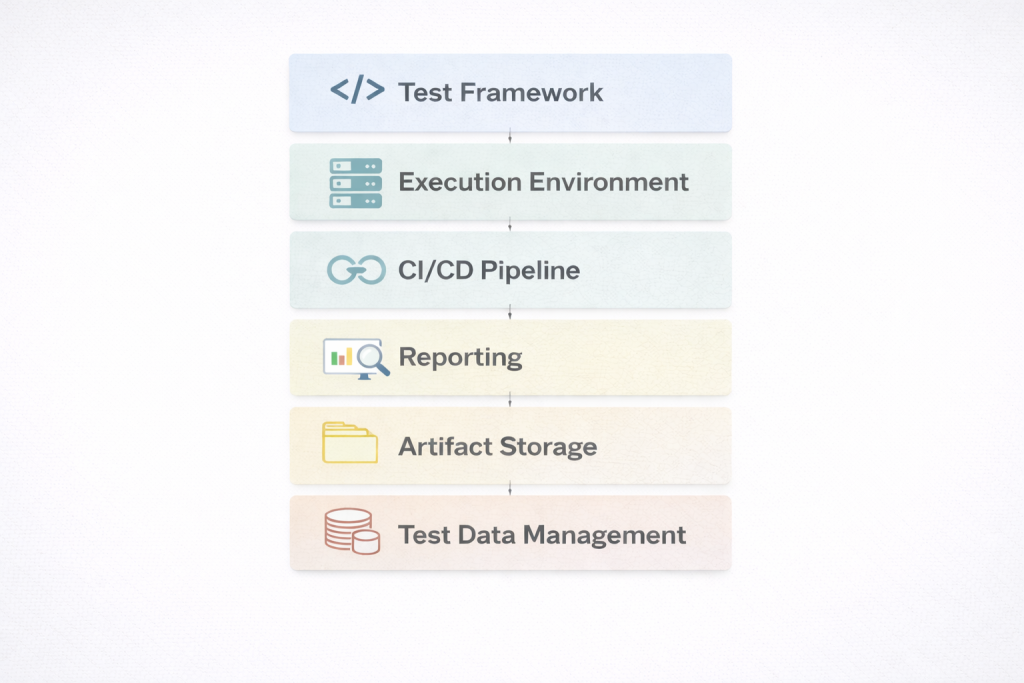
Many developers first encounter automation through a single framework. It is easy to assume that installing a tool solves the testing problem. In practice, a real test automation solution is much broader. It works as a layered system where several components cooperate to run, analyze, and maintain tests over time.
A typical automation architecture often includes:
- an automation framework that executes tests
- environment orchestration for stable test environments
- CI pipeline triggers that run tests after commits
- reporting dashboards that visualize failures
- artifact storage for logs, screenshots, and traces
- test data management for predictable scenarios
Each layer handles a different part of the testing workflow.
Framework layer
Frameworks interact directly with the application interface. They simulate user actions, verify results, and capture failures.
Common examples include:
- Playwright — modern browser automation with parallel execution
- Selenium — long-standing cross-browser automation ecosystem
- WebdriverIO — framework widely used in JavaScript testing stacks
These tools execute tests themselves. However, none of them forms a complete testing system on its own.
Pipeline and reporting layer
Automation becomes truly useful when it connects to the development pipeline. Tests should run automatically whenever code changes.
Typical stack components include:
- GitHub Actions or Jenkins to trigger test runs after commits
- Allure dashboards to track failures and execution history
When these layers connect, teams effectively operate test automation suites that continuously validate product behavior during development.
When these layers connect, teams effectively operate test automation suites that continuously validate product behavior during development. Successful automation depends on the system around the framework, not the framework alone.
Three Common Architectures for Test Automation Solutions
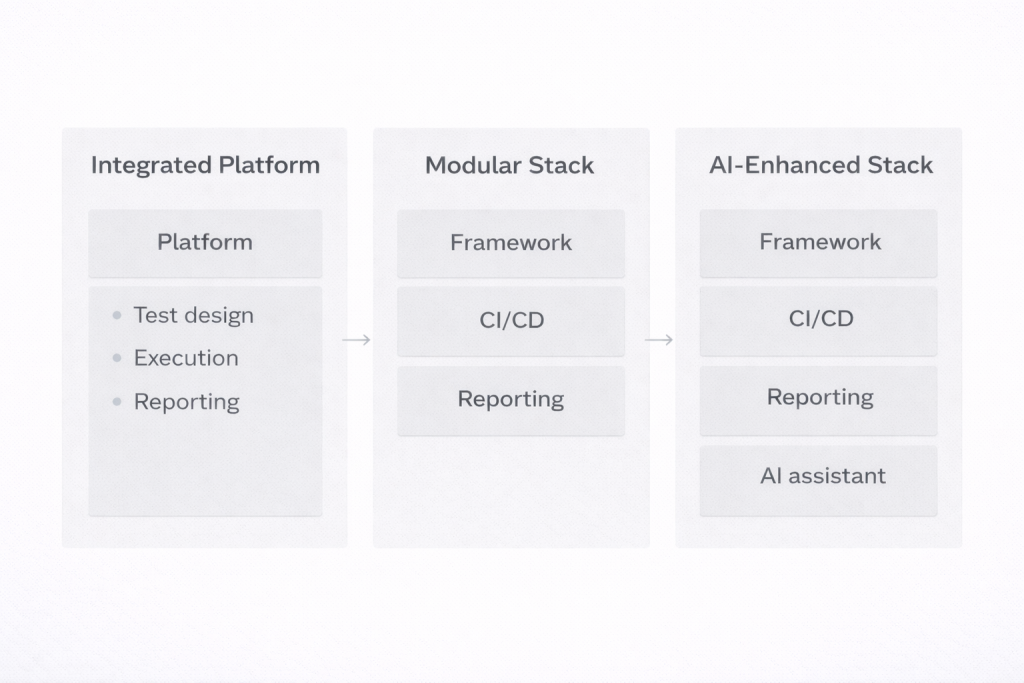
Teams rarely build automation the same way. Much depends on the product, the release speed, and the engineering culture. A startup shipping updates every few days usually approaches testing very differently from a large enterprise maintaining a complex system. In practice, most test automation solutions fall into three broad patterns.
Integrated testing platforms
Some companies prefer an environment where most testing capabilities already come packaged together. In this category you will often see tools like Katalon, Tricentis Tosca, or ACCELQ. They combine test design, execution infrastructure, reporting, and CI integration in one interface.
The attraction is obvious: a team can start automating tests without assembling multiple tools first. Managers also appreciate having centralized dashboards that show execution results and coverage in one place. The downside appears later. These test automation platforms tend to impose their own workflow, and customization can become difficult if a team wants to integrate unusual tools or adapt the process.
Modular engineering stacks
Many product teams take the opposite approach. Instead of adopting a single platform, they combine several test automation tools and frameworks that each solve one part of the problem.
A common example looks like this: Playwright runs browser tests, GitHub Actions triggers them whenever code is pushed, and Allure collects the reports. The advantage is flexibility. If a team decides to replace Playwright later or change reporting, they can swap a component without rebuilding the whole stack.
Custom stacks enhanced with AI
Some organizations push automation further and add an intelligence layer on top of their stack. Instead of only executing tests, the system analyzes what happens during those runs. For example, an internal assistant might scan logs, group similar failures, or suggest new test scenarios based on recent code changes. These setups represent a more advanced automated testing solution strategy that many engineering teams are beginning to explore.
Key Tools Used in Modern Automation Stacks

When people talk about automation, they often imagine a single framework doing all the work. In reality, a working automation setup looks more like a toolkit. Different components solve different problems. One runs browser tests, another verifies APIs, another provides infrastructure where everything executes. Together these pieces become the software automation testing tools that support real testing pipelines.
Most teams organize their stack in a few practical layers.
UI Automation
Browser automation is usually the first thing teams implement because it validates what real users see. Two tools appear frequently in modern stacks:
- Playwright — widely adopted for modern web apps because it runs tests in parallel and isolates browser sessions well. That reduces the flaky behavior many older test suites struggled with.
- Cypress — especially popular among frontend teams. It runs inside the browser and shows what the test is doing step by step, which makes debugging much easier.
These frameworks usually power end-to-end scenarios such as logging in, navigating dashboards, or completing checkout flows.
Mobile Testing
Mobile apps require frameworks that can control devices or simulators.
- Appium
- XCUITest
Appium is often used when teams support both Android and iOS because the same testing logic can work across platforms.
API and Backend Testing
A lot of defects appear in backend services before the interface even loads. That is why many teams automate API validation.
- Postman
- REST Assured
These tools send requests to endpoints, verify responses, and confirm that authentication or business logic behaves correctly.
Cloud Test Infrastructure
Once a project grows, running tests locally becomes limiting. Teams need infrastructure that can run hundreds of tests across multiple browsers and devices.
- BrowserStack
- Sauce Labs
Platforms like these allow automated suites to execute simultaneously across many environments, which dramatically shortens test cycles.
How to Choose the Right Stack: Practical Selection Criteria

Picking between different test automation solutions usually starts with the product itself, not the tools. A web dashboard, a mobile app, and a backend API service behave differently, so the testing stack should reflect that. Frontend-heavy apps built with React or Angular often pair well with frameworks like Playwright or Cypress because they handle modern browser behavior and asynchronous UI updates reliably. Mobile products follow another path entirely. In those cases teams usually rely on Appium to interact with Android and iOS devices.
In practice, teams often evaluate automation stacks through a few practical questions. What skills does the team already have? Developer-driven teams usually prefer code-first frameworks that integrate naturally with the application codebase. QA-heavy teams sometimes choose integrated environments that simplify test creation and reporting.
Another consideration is the architecture of the product itself. Browser applications, mobile apps, and API-based systems require different testing priorities and often different tool combinations. A UI-focused product may emphasize browser automation, while a backend service might depend more on API testing.
How Release Process and Scale Affect Tool Selection
Release speed also changes the requirements. Teams deploying updates every few days need tests that run reliably inside CI pipelines and support parallel execution across multiple environments.
The next question is how automation fits into the release process. Tests should run automatically when new code lands in the repository. Most teams connect their suites to CI systems such as Jenkins or GitHub Actions so every commit triggers a build and a test run. If a failure appears, the pipeline stops the deployment and developers see the problem before it reaches production.
Scale becomes important sooner than many teams expect. A suite that runs quickly with twenty tests may slow down badly once it grows to a few hundred. Parallel execution and distributed runners solve this problem by spreading tests across multiple environments.
Reporting often ends up being the quiet deciding factor. Engineers need screenshots, logs, and execution history when something fails. Without clear diagnostics, even well-designed quality assurance automation tools become frustrating to maintain.
Example ROI: Automation vs Manual Regression Testing
Consider a regression pack with 200 tests. If a tester runs them manually and each case takes about seven minutes, the full cycle lasts roughly 1,400 minutes — a little over 23 hours. That is nearly three working days for a single regression pass.
Automation changes the math. The same 200 tests can run in parallel and finish in about 30 minutes. An engineer then spends another hour reviewing results and investigating failures.
| Testing approach | Time required |
| Manual regression | ~23 hours |
| Automated pipeline | ~1.5 hours |
If the team releases once a week, the difference adds up quickly — more than 1,100 QA hours saved per year. That simple calculation is one of the main reasons companies adopt test automation solutions instead of expanding manual regression teams.
AI Is Becoming the Next Layer of Automation

Running tests is no longer the main bottleneck. Most teams solved that part years ago. Playwright, Cypress, or similar frameworks can execute hundreds of checks in minutes. The real time sink starts after the run finishes, when someone has to read logs and figure out what actually broke.
That is where AI tools have started creeping into QA workflows.
“The market data is unambiguous: 80% of enterprises will adopt AI-augmented testing by 2027, while traditional automation approaches face declining market share and increasing obsolescence.”
— Rishabh Kumar, Marketing Lead, Virtuoso QA blog
Once the basic automation stack is built, the logical next step is to add an AI layer: an assistant that generates tests, highlights risks, and assists the team.
A few patterns are starting to show up in real teams:
- Extra test suggestions. Some assistants scan existing scenarios or API specs and propose additional cases. Engineers still review them, but it removes a lot of repetitive writing.
- Failure grouping. When a backend outage causes fifteen tests to fail at once, the system clusters them together so developers chase one root cause instead of fifteen symptoms.
- Regression hints. By looking at previous failures and recent commits, the assistant can point testers toward areas that historically break more often.
Building Your Own Testing Assistant With Scrile AI
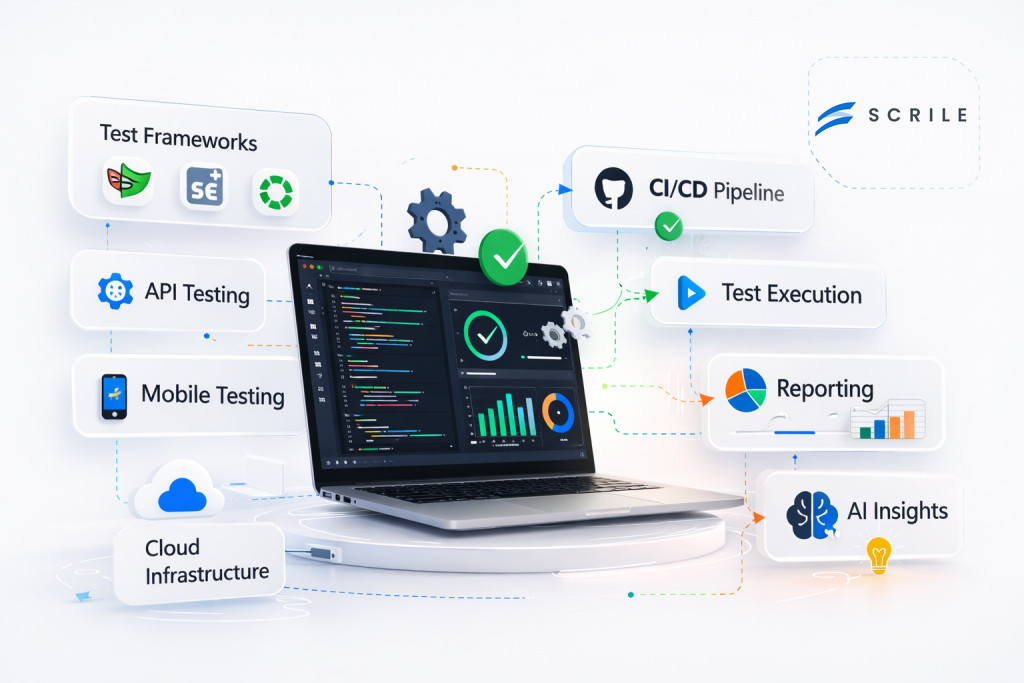
After a testing stack is in place, many teams start looking at what comes next. Running tests is no longer the hardest part of QA pipelines. The bigger challenge is understanding failures, spotting patterns across runs, and expanding coverage without spending hours writing new scenarios.
Once the basic automation stack is built, the logical next step is to add an AI layer: an assistant that generates tests, highlights risks, and assists the team.
Some organizations keep such assistants as internal tools used only by their QA teams. Others turn them into standalone services that analyze test results across multiple projects or products. In both cases the assistant becomes an additional layer on top of the existing testing infrastructure.
This is where Scrile AI becomes useful. Scrile AI is not another testing tool. It is a development service that helps companies build their own AI products around existing workflows. Instead of adapting to a rigid system, teams can design assistants that fit their testing environment.
A custom testing assistant can handle several practical tasks:
- Generating additional test scenarios. The assistant can review existing coverage and suggest new cases for parts of the product that appear risky or under-tested.
- Analyzing execution logs and failures. Large regression runs produce huge volumes of logs. The assistant can scan them and highlight patterns that reveal the root cause of issues.
- Summarizing CI pipeline results. After each run, the assistant can produce short explanations of failures so developers quickly understand what happened.
Because Scrile AI includes user management, integrations, and payment infrastructure, companies can use such assistants internally or launch them as standalone services for their clients.
Choosing the Right Automation Stack Model for Your Team
The table above described architectural models. In practice, teams assemble stacks differently depending on their product and organization. The examples below show how automation setups often look in real projects.
| Team or Product Type | Typical Stack Setup | Why It Works |
| Small SaaS startup | Playwright + CI pipeline (GitHub Actions) + reporting + lightweight AI assistant | The stack stays simple but an AI helper can suggest extra tests from recent feature changes and summarize failed runs so developers fix issues faster. |
| Enterprise product | Selenium Grid + Jenkins pipelines + centralized reporting + internal AI analysis tools | Large regression suites benefit from AI that groups similar failures, analyzes logs, and flags risky modules after large code changes. |
| Mobile application | Appium + device cloud infrastructure + API testing layer + AI-assisted diagnostics | Mobile testing produces many environment-related failures. AI tools help detect patterns across devices and highlight real defects instead of noise. |
| QA consulting company | Modular automation stack + custom AI assistant built with Scrile AI | Teams can build assistants that generate tests, analyze results across projects, prioritize regressions, and even launch AI-powered QA services for clients. |
Conclusion
Automation has grown into a full engineering discipline. Modern test automation solutions combine frameworks, CI pipelines, reporting systems, and execution infrastructure into cohesive stacks that run alongside development.
The most reliable strategy begins with a solid foundation. Teams start by implementing stable frameworks and reporting workflows that run consistently inside their delivery pipelines. Once that structure is in place, an additional intelligence layer can analyze failures, suggest new test scenarios, and guide regression testing toward the parts of the product most likely to break.
If your team is ready to move in that direction, consider exploring what an AI testing assistant could look like in your workflow. Test Scrile AI solutions to see how custom AI tools can help automate analysis, expand coverage, and make large test suites easier to manage.
Related guides
- AI Avatar Generator in 2026: Use Cases & Tips
- AI Character Creator: Build a Persona That Scales in 2026
- How to Promote Your AI Companion Website in 2026
- How Creators Use AI to Sell More Content and Engage Fans
FAQ
What is a test automation solution?
A test automation solution is not just a single testing tool. It is the full environment used to run automated tests during the development process. This typically includes a testing framework, CI pipelines that trigger tests after code changes, reporting tools for analyzing failures, and infrastructure where the tests run. Together these components create a connected system that supports continuous testing.
Which tool is commonly used for test automation?
Selenium is one of the most widely used tools for automated testing because it supports multiple programming languages and browsers. Many teams also use newer frameworks such as Playwright or Cypress depending on the technology stack. The most effective approach is selecting tools that integrate well with the development pipeline and testing workflow.
What is an automation solution?
An automation solution replaces repetitive manual tasks with automated processes. In software testing, this means automated scripts can execute test scenarios, verify results, and produce reports without manual intervention. Automation improves speed, consistency, and accuracy compared to repeating the same tests manually.
How do you choose the right automation testing stack?
Choosing the right testing stack starts with understanding the product architecture. Web applications, mobile apps, and backend services require different testing tools. Teams should also evaluate how well the tools integrate with CI pipelines, whether they scale to large test suites, and whether they provide clear reporting for diagnosing failures.
Can AI improve automated testing?
AI can improve automated testing by analyzing test results, generating additional test scenarios, and helping engineers understand failures faster. Instead of replacing testing frameworks, AI works on top of existing automation stacks to summarize logs, group similar errors, and highlight areas of the product that may carry higher regression risk.
